GTM integration
We would like to transfer data from platform to web analytics service. We have no final decision about web analytics, that's why we would like to take a bet on Google Tag Manager, which allows us to make some sophisticated abstraction.
Installation
GTM installs as a script on a page, that could be lazy loaded. Example: In a header block:
<!-- Google Tag Manager -->
<script>(function(w,d,s,l,i){w[l]=w[l]||[];w[l].push({'gtm.start':
new Date().getTime(),event:'gtm.js'});var f=d.getElementsByTagName(s)[0],
j=d.createElement(s),dl=l!='dataLayer'?'&l='+l:'';j.async=true;j.src=
'https://www.googletagmanager.com/gtm.js?id='+i+dl;f.parentNode.insertBefore(j,f);
})(window,document,'script','dataLayer','GTM-XXXX');</script>
<!-- End Google Tag Manager -->
After opening body tag:
<!-- Google Tag Manager (noscript) -->
<noscript><iframe src="https://www.googletagmanager.com/ns.html?id=GTM-XXXX"
height="0" width="0" style="display:none;visibility:hidden"></iframe></noscript>
<!-- End Google Tag Manager (noscript) -->
In a code above you should change GTM-XXXX to your container code.
Frontend integration
From frontend part we have to install two kinds of snippets.
Data Snippet
Upon app load, we have to populate user attributes in a DataLayer. For example like that:
window.dataLayer = window.dataLayer || [];
window.dataLayer.push({
 'uid': '32131', // user id of visitor
 'language': 'ru', // language
 'registrationDate': 23131323 // timestamp of registratoin date\time
 });
That snippet is a fail-safe, if GTM is blocked by ADBlock it will not cause web to fail.
Event Snippet
When we want to pass event into analytics we should push data within a special key event.
window.dataLayer = window.dataLayer || [];
window.dataLayer.push({
 'event': 'deposit_event', // event name
 'eventCategory': 'deposit', // event category for Google Analytics
 'eventAction': 'start', // event action for Google Analytics
 'eventValue': 'USDT', // event value for Google Analytics
 });
Keys except event are optional, but it's easy to handle them using a common handler at GTM side.
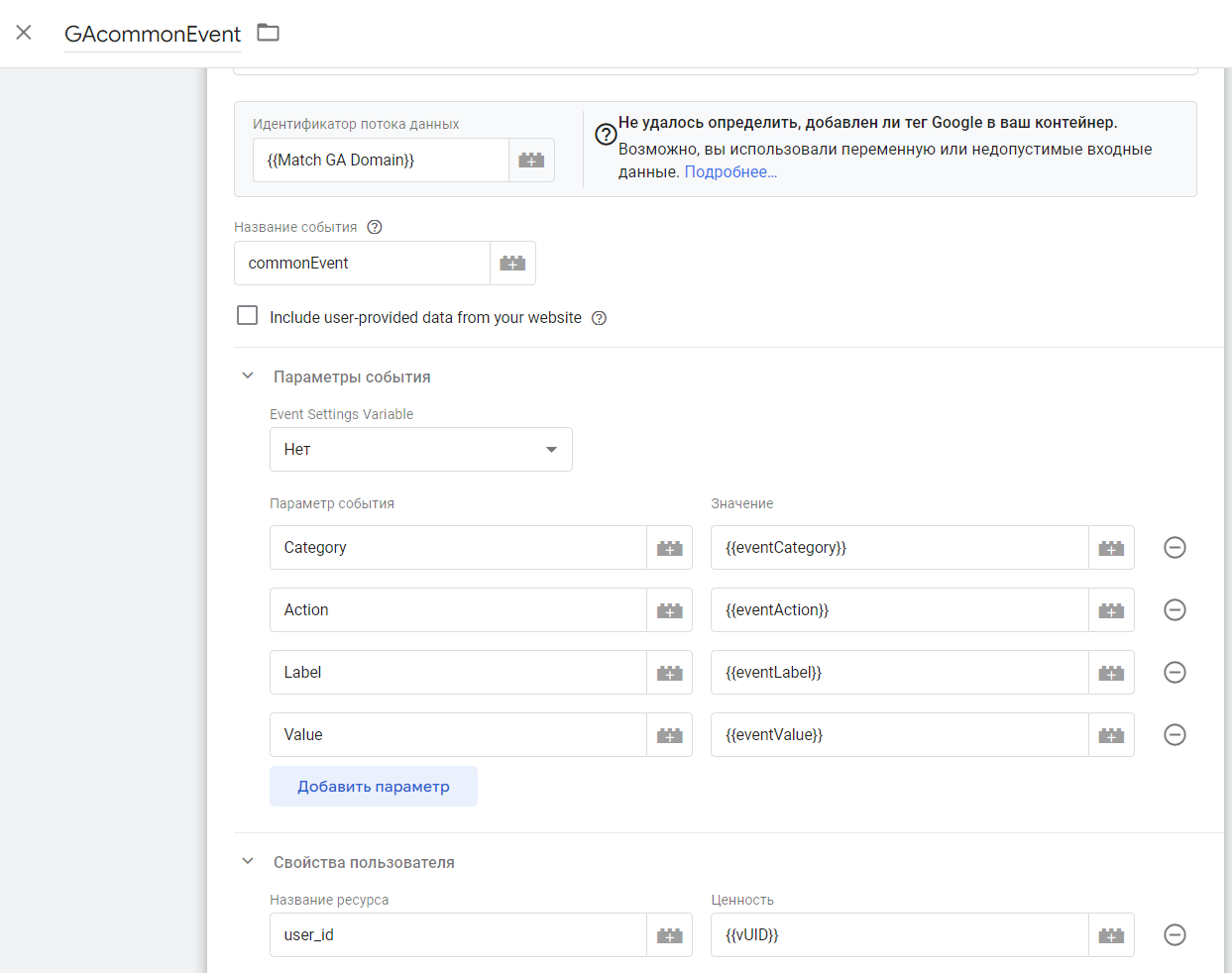
Be aware that
user_idis a special param, that used across all events to attribute any data or event to user. There is NO SESSIONS in GA4, each event should be directly attributed, without that there is no use of data inside GTM.
Further Reading
PostHog
PostHog has very similar api, that allows to pass data inside web analytics. But it has a bit more specific methods. Mostly related to session. Also methods below works the same way if PostHog installed directly or via GTM. It means that you can deliver PostHog script in any suitable way.
Install directly.
Just put into head.
<script>
    !function(t,e){var o,n,p,r;e.__SV||(window.posthog=e,e._i=[],e.init=function(i,s,a){function g(t,e){var o=e.split(".");2==o.length&&(t=t[o[0]],e=o[1]),t[e]=function(){t.push([e].concat(Array.prototype.slice.call(arguments,0)))}}(p=t.createElement("script")).type="text/javascript",p.async=!0,p.src=s.api_host+"/static/array.js",(r=t.getElementsByTagName("script")[0]).parentNode.insertBefore(p,r);var u=e;for(void 0!==a?u=e[a]=[]:a="posthog",u.people=u.people||[],u.toString=function(t){var e="posthog";return"posthog"!==a&&(e+="."+a),t||(e+=" (stub)"),e},u.people.toString=function(){return u.toString(1)+".people (stub)"},o="capture identify alias people.set people.set_once set_config register register_once unregister opt_out_capturing has_opted_out_capturing opt_in_capturing reset isFeatureEnabled onFeatureFlags getFeatureFlag getFeatureFlagPayload reloadFeatureFlags group updateEarlyAccessFeatureEnrollment getEarlyAccessFeatures getActiveMatchingSurveys getSurveys".split(" "),n=0;n<o.length;n++)g(u,o[n]);e._i.push([i,s,a])},e.__SV=1)}(document,window.posthog||[]);
    // pragma: allowlist nextline secret
    posthog.init("phc_", {
       api_host: "https://myposthog.com", // url of posthog instance
       persistence: "localStorage+cookie",   // we use that to reduse size of requers
       enable_recording_console_log: true,   // it's usefull to track user errors
       disable_session_recording: false,   // we disable session recording by default
    });
</script>
We recommend tuning a bit of default settings, like changing persistence mode to less traffic consuming localStorage+cookie
List of settings
Identify
posthog.identify — this method required to merge user sessions by real user id. It's good to make identification before sending other events.
/// identify user
posthog.identify(
  '132132132',  // uid user's unique identifier
  { email: '[email protected]', name: 'Max Hedgehog' } // optional: set additional user info, email and name are predefined properties
);
/// after logout
posthog.reset()
Capture
Using this method, we can trigger a special event inside PostHog event stream. Doc
posthog.capture("event_name", { // this event stored in posthog timeline
       $set: {
	    email: "[email protected]",
	    phoneCode: "380",
	    phoneNumber: "505534433",
	    currency: "eur",
	    countryCode: "ua",
},
  })
Be aware, that special events triggered from API are stored inside event stream in ClickHouse. Events that made using event builder exist only in PostHog WebUI, and not stored inside event stream. But manually captured events stored as is, and available for further analyst in PowerBI
Special classes
You may want to exclude some elements from capture. It means that clicks on those elements are not recorded, also those elements are excluded from heatmaps. no-capture-class
<div class="ph-no-capture">
...
</div>
All child elements of that div will be absent in click log.