Goal:
This document outlines best practices for designing and implementing an analytics subsystem, illustrated with examples from a casino environment.
Concepts
As a business I want to be sure, that my reports could not affect performance of production env. That's why typical solution is to add additional "analytics" data warehouse.
As an analyst, working with normalized datasets can be cumbersome. Flat data structures, even incorporating JSON fields, are often preferable for analytical tasks, simplifying queries and reducing the need for complex JOINs. Therefore, columnar databases like BigQuery or ClickHouse are highly recommended for storing analytical data. Furthermore, query performance and cost are directly related to the number of columns accessed. Minimizing the number of queried columns is crucial for efficient analytics.
Analytical work typically focuses on data dynamics rather than static snapshots. Tracking changes for each entity is essential. Ideally, the system should allow for reconstructing data snapshots at any point in time. This necessitates an event stream data model or a mechanism for capturing data snapshots upon each modification.
pinpoints
- Columnar Databases: Leverage columnar databases (e.g., BigQuery, ClickHouse) for optimal query performance and cost-effectiveness. These databases excel at handling analytical workloads by efficiently retrieving only the necessary columns.
- Flat Data Structures: Prioritize flat data structures over highly normalized models. While normalization is important for transactional systems, flat data simplifies analytical queries, reduces JOINs, and improves performance. JSON fields can be used to encapsulate related data elements within a single record.
- Event Streaming: Implement an event stream data model to capture every change to relevant entities. This provides a comprehensive history of data modifications, enabling time-based analysis and snapshot reconstruction.
- Snapshotting: If an event stream is not feasible, implement a mechanism for creating data snapshots upon each modification. This ensures that historical data is preserved and can be used for analysis. Consider the frequency of changes and storage implications when designing the snapshotting strategy.
Examples
Profile data
User profile data is highly dynamic. Today we can have 5 fields, tomorrow 10 fields in profile, next month we can deprecate first 5 fields. Because of that, we can bet on EAV data model (Entity, Attribute, Value).
Table: user_update
- id: transactionID (uniq, uuid v7 or similar)
- created_at: timestamp (actual event time)
- user_id: string (related userId)
- property: string (name of modified property, like name, surname)
- value_type: enum or string (type of the value, like string, bool etc)
- value_string: string (new value)
- issuer_id: string (reference to source of update)
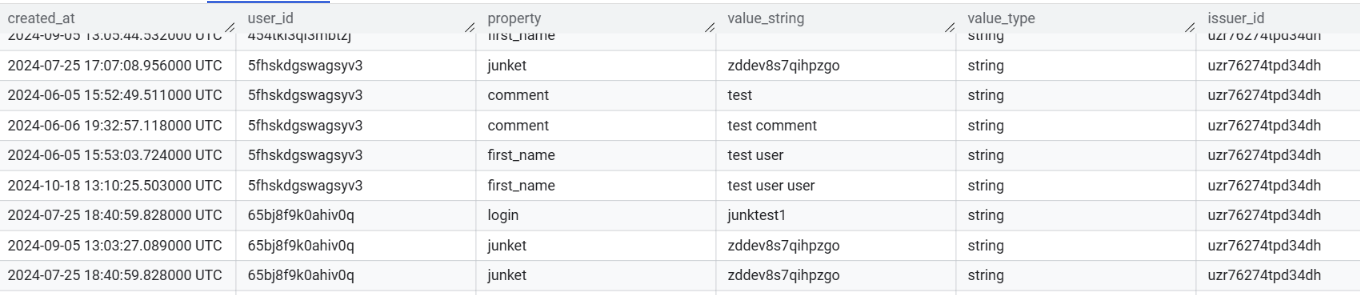 This kind of data is easy to provide from backend, and easy to trace profile modifications. But if we want to get actual profile state, it could be a bit complex. To avoid complex queries we can store SQL View, which will be a shortcut to other reports, for obtaining profile data in more readable way:
 WITH last_values AS (
  SELECT DISTINCT
  user_id,
   _table_suffix client,
  property,
  created_at,
  value_string,
  first_value(value_string) over (partition by user_id, property order by created_at desc) last_value_string,
  FROM `analytics.user_update_*`
  QUALIFY last_value_string = value_string AND property != 'comment' OR property = 'comment' AND trim(value_string) != ''
)
SELECT
  client,
  user_id,
  MAX(CASE WHEN property = 'login' THEN value_string END) AS login,
  MAX(CASE WHEN property = 'first_name' THEN value_string END) AS first_name,
  MAX(CASE WHEN property = 'last_name' THEN value_string END) AS last_name,
  MAX(CASE WHEN property = 'birthday' THEN value_string END) AS birthday,
  MAX(CASE WHEN property = 'status' THEN value_string END) AS status,
  MAX(CASE WHEN property = 'registered' THEN value_string END) AS registered,
  STRING_AGG(CASE WHEN property = 'comment' THEN format_timestamp('%Y-%m-%d %H:%M', created_at) || ': ' || value_string END, '\n') AS comment
FROM
  last_values
GROUP BY
  client, user_id
Result will look like:
 This kind of data structure could be used within any entity, but be aware that instead of views, there are other ways to materialize snapshots, that could be cheaper on big amounts of data. Because EAV model itself is a bad practice in terms of performance and type-checking, but in case of working with analytics data - its very easy to adopt, and optimize performance within different materialization strategies.
Transactions data
Transactions data usually a very big dataset, that's why we should try to make every row in it self-containing. Like embedding previous and new state, alongside with diff to each row in dataset.
Table: Transactions
- id: uuid (transaction ID)
- created_at: timestamp (time of event)
- action: string or enum (what was happening, bet, win, refund)
- diff: integer (actual balance modification)
- old_balance: integer (balance before transaction)
- new_balance: integer (balance after transaction)
- user_id: uuid or string (which user was affected)
- issuer_id: uuid or string (who is initiator of transaction, user, admin etc)
Actual transaction table will have many more columns, but the idea should be clear.
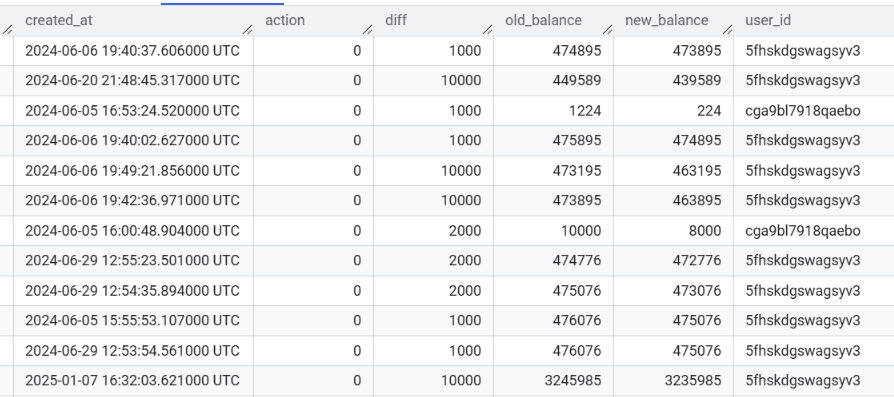 Its very easy to build reports using that table.
Reusing reports
You may see clientID quirk in user profile snapshot. It could be super handy solution to make reusable reports, but unfortunately its BigQuery specific.
FROM `analytics.user_update_*`
this query will work with all tables that have user_update_ in their name. If those tables have similar DDL, it even wouldn't crash :)
The name of the actual table will be available as a separate column, which is filterable.
Using that trick you may reuse views, reports between customers, by setting hardcoded filter in customer report. We hardly depend on that trick at a few projects, and can say that it works like a charm in combination with metabase, but could be adapted to other BI systems.